
A strong Wi-Fi connection is no longer optional—it’s essential. Yet even with a high-end router, large homes, multi-story layouts, and thick walls can leave you with frustrating dead zones.
That’s where Wi-Fi extenders come in. These plug-in devices capture your existing wireless signal and rebroadcast it, filling weak spots with reliable coverage.
Below are the best Wi-Fi extenders of 2026, along with expert testing notes, buying tips, and answers to common questions.
Quick Glance of The Best WIFI Extenders of 2026
No products found.
Quick List
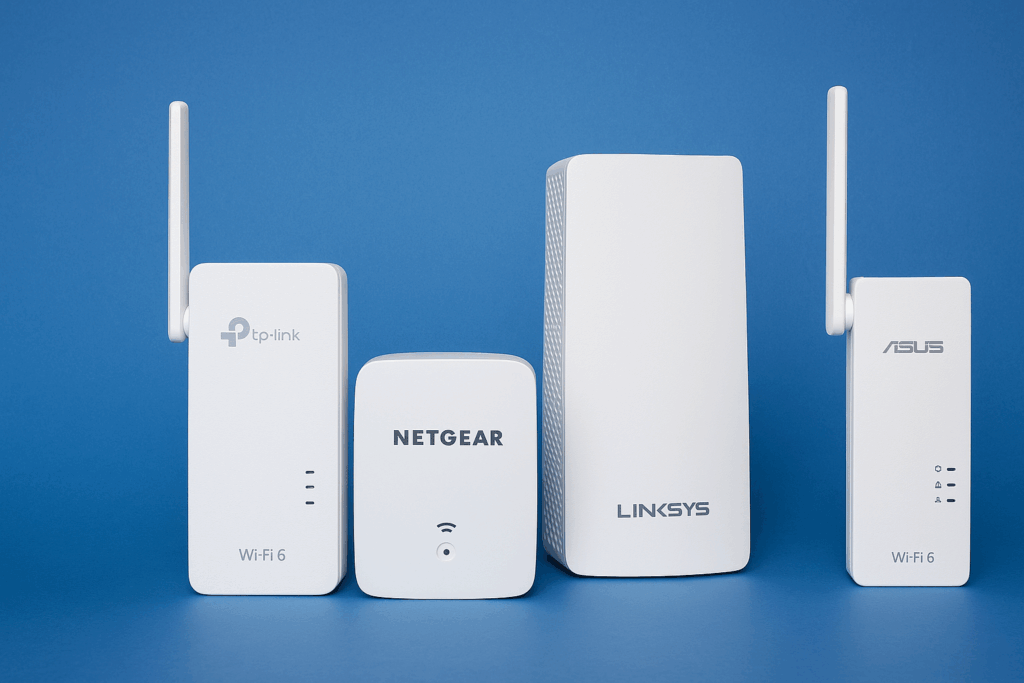
- Best Overall Wi-Fi Extender: TP-Link RE700X – Delivers excellent Wi-Fi 6 speeds, simple app setup, and strong coverage.
- Best Budget Pick: Netgear EX2800 – Affordable and reliable for small spaces.
- Best Long-Range Model: Linksys RE7310 – Extends signal across larger properties, including outdoors.
- Most Reliable Performance: Asus RP-AX58 – Consistent speeds for gamers and streamers.
Best Overall: TP-Link RE700X
The TP-Link RE700X earns its place as the best overall Wi-Fi extender because it strikes the perfect balance between performance, price, and ease of use.
Supporting Wi-Fi 6, it delivers fast and stable speeds across multiple devices, whether you’re streaming 4K content, joining back-to-back Zoom calls, or running smart home systems.
Its companion app makes setup simple even for non-technical users, guiding you step by step through placement and configuration.
Compact enough not to hog wall outlets, it’s also compatible with TP-Link’s EasyMesh ecosystem, so you can transform your home into a full mesh network later if needed. For households that want a reliable, future-proof option, the RE700X checks every box.
Best Budget: Netgear EX2800
If affordability is your top concern, the Netgear EX2800 is a clear winner. At under $40, it’s one of the cheapest ways to eliminate dead zones without compromising basic functionality.
Despite its low price, the EX2800 offers dual-band connectivity, providing enough bandwidth for everyday activities like browsing, email, HD video streaming, and video calls.
Its compact plug-in design is great for apartments, dorms, or smaller homes where coverage issues are limited to just one or two rooms.
While it doesn’t include advanced features like Ethernet ports or app-based controls, it’s a no-nonsense solution that proves you don’t need to break the bank for stronger Wi-Fi.
Best Long-Range: Linksys RE7310
For larger homes, multi-story layouts, or anyone who wants Wi-Fi in outdoor spaces like the backyard or garage, the Linksys RE7310 shines as the long-range champion.
Built with Wi-Fi 6 technology, it can handle multiple devices simultaneously without bogging down performance. Its Gigabit Ethernet port provides an option for high-speed wired connections, which is particularly useful for gaming consoles or smart TVs.
During testing, it proved capable of maintaining stable speeds even at long distances, making it perfect for households with multiple coverage gaps. If your router alone can’t push signal across your entire property, the RE7310 is designed to bridge the gap.
Most Reliable: Asus RP-AX58
Reliability is where the Asus RP-AX58 excels. Designed with gamers, streamers, and heavy internet users in mind, it delivers consistent speeds with minimal packet loss or dropouts. Built on Wi-Fi 6, it ensures stable performance even when multiple devices are connected.
One of its standout features is integration with Asus AiMesh, allowing you to combine it with other Asus routers and extenders to create a seamless mesh system.
That makes it an excellent choice for users who want both immediate reliability and long-term flexibility. Whether you’re hosting online matches, streaming in 4K, or running a smart home ecosystem, the RP-AX58 provides the dependable connection you need.
How to Choose the Right Extender
Selecting the right Wi-Fi extender isn’t just about picking the most expensive option—it’s about choosing one that fits your specific needs:
- Match Wi-Fi Standards: Make sure your extender supports the same Wi-Fi generation as your router (Wi-Fi 5, Wi-Fi 6, or Wi-Fi 7). This ensures maximum compatibility and performance.
- Assess Coverage Needs: Smaller apartments may only need a budget extender, while large multi-story homes benefit from long-range or mesh-capable models.
- Consider Mesh Support: If you expect to expand your network later, look for extenders with mesh capabilities so you won’t need to replace hardware.
- Check for Extra Features: Ethernet ports are valuable for gaming consoles and smart TVs, while scheduling options or app controls can make managing your network easier.
- Balance Price vs Features: Don’t pay for premium specs you won’t use—focus on the features that solve your specific Wi-Fi challenges.
Do You Really Need an Extender?
Not always. Sometimes repositioning your router, upgrading its antennas, or switching channels can fix weak spots. But if your home is large or has concrete/brick walls, an extender is the easiest fix. For gigabit internet or smart homes with dozens of devices, consider a mesh Wi-Fi system for even better results.
Wi-Fi Terms Explained
- Wi-Fi 6 / Wi-Fi 7: Newer generations offering faster speeds and better efficiency.
- Dual-Band: Uses 2.4 GHz (long range) and 5 GHz (high speed).
- Mesh Network: A system where routers and extenders act as a unified network.
- Ethernet Backhaul: A wired connection between router and extender for top performance.
FAQs
What’s the difference between a Wi-Fi extender and a mesh system?
Extenders boost an existing signal, while mesh systems replace your network with multiple nodes that work together for seamless coverage.
Will a Wi-Fi extender slow down my internet speed?
Some speed loss is normal, but modern Wi-Fi 6 extenders minimize it. Placement and proper configuration also matter.
Can I use more than one Wi-Fi extender at a time?
Yes, but daisy-chaining multiple extenders often causes instability. A mesh system is better for large coverage needs.
Where is the best place to install a Wi-Fi extender?
Halfway between your router and the dead zone. Too close to the router, and it won’t expand coverage; too far, and it won’t get a strong enough signal to rebroadcast.
Are Wi-Fi extenders compatible with all routers?
Most are, but you’ll get the best performance when router and extender use the same Wi-Fi generation (e.g., Wi-Fi 6 with Wi-Fi 6).
Do Wi-Fi extenders work with smart TVs and gaming consoles?
Absolutely. Many offer Ethernet ports for direct wired connections, which is ideal for gaming or streaming.
Is it better to use 2.4 GHz or 5 GHz on an extender?
2.4 GHz travels farther but is slower, while 5 GHz is faster but shorter range. Many extenders are dual-band, so you can use both.
Do Wi-Fi extenders increase internet speed?
They don’t increase your ISP speed but ensure you get closer to your subscribed speeds in previously weak areas.
Should I upgrade to a Wi-Fi 7 extender in 2025?
Only if you already have a Wi-Fi 7 router or plan to get one. Otherwise, a Wi-Fi 6 extender provides excellent value and compatibility.